CrewdUp
    ⚡Purpose-built for live production teams

    The complete crew management
    platform for live production

    From first assignment to final confirmation, CrewdUp makes the hard parts of broadcast scheduling simple — so you can produce more with less stress.

    See how it worksStart for free

    Up to 31 days free · No credit card required
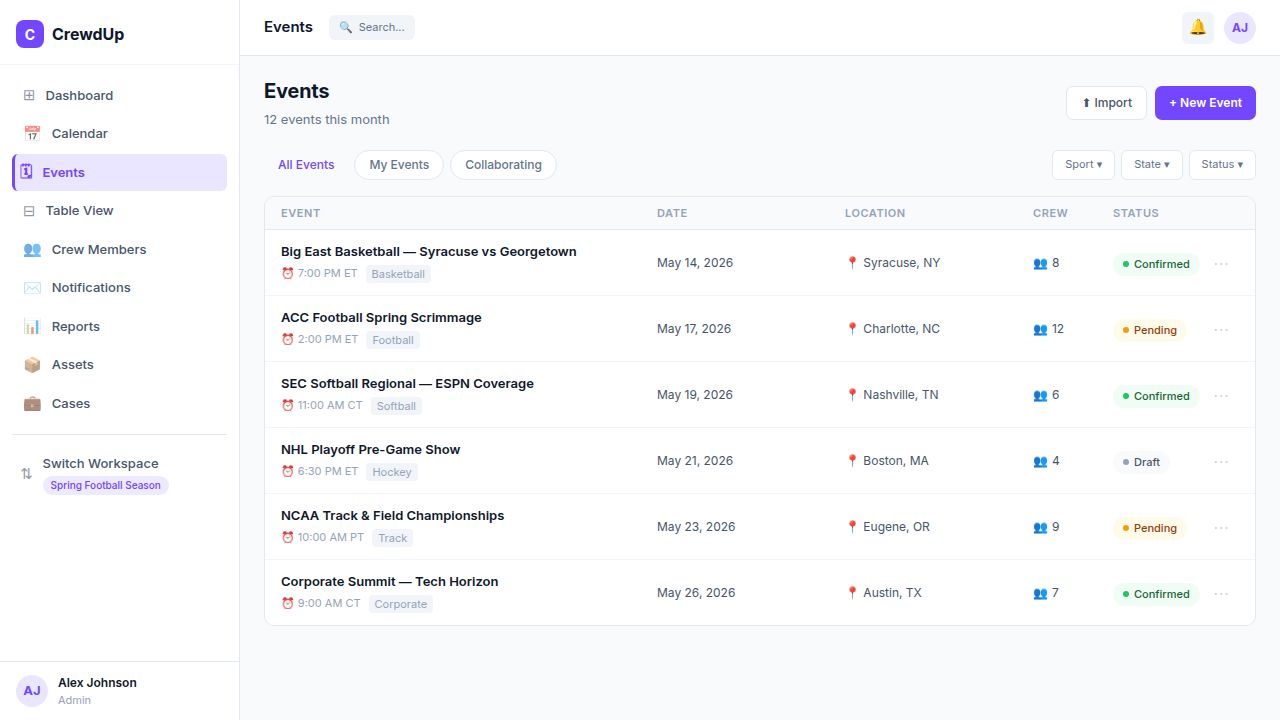
    Event Management
    How it works

    From zero to fully staffed
    in three steps

    CrewdUp replaces the spreadsheets, group texts, and manual emails your team is drowning in right now.

    1
    Create your event

    Every production detail,
    in one place

    Build out your event with sport, venue, network, call times, and timezone in minutes. Production notes, tech requirements, and contacts all live on the same page — no more hunting through email threads.

    📅
    Date, time & timezone-aware scheduling
    📍
    Location, venue & travel details
    📡
    Network, sport, gender & level tagging
    📝
    Tech requirements & production notes
    New Event
    Event Title
    ACC Football Spring Scrimmage
    Sport
    Football
    Network
    ESPN Regional
    Date
    May 17, 2026
    Call Time
    12:00 PM ET
    Location
    📍 Charlotte, NC — Bank of America Stadium
    Create Event →
    Crew Assignments
    + Add Crew
    MR
    Marcus Rivera
    Camera Operator A
    Confirmed
    JT
    Jess Thornton
    Audio Engineer
    Confirmed
    DW
    Devon Walsh
    Graphics Operator
    Pending
    TK
    Taylor Kim
    Technical Director
    Invited
    PS
    Priya Singh
    Replay Operator
    Open
    2 of 5 confirmed
    2
    Build & invite your crew

    Assign positions, send
    invites automatically

    Pull from your saved crew roster, assign each person to a role, and hit send. CrewdUp emails every crew member an invitation with a one-click confirm or decline link — no account needed on their end.

    👥
    Drag from roster or search by skill tag
    ✉️
    Branded invitation emails sent instantly
    🔗
    One-click confirm/decline — no login needed
    📅
    Calendar invite (.ics) auto-attached on confirm
    3
    Track everything in real time

    Confirmations, gear, reports —
    nothing slips through

    Watch confirmations come in live, get notified the moment someone declines, auto-reassign open positions, and monitor where every piece of gear is — all from a single dashboard.

    🔔
    Real-time confirmation & decline alerts
    📦
    Live asset location & status tracking
    📊
    Utilization reports per event & per crew member
    🗓
    Calendar view across all events & workspaces
    Live ActivityACC Football · May 17
    ✅
    Marcus Rivera confirmed
    Camera Operator A · 2 min ago
    ✅
    Jess Thornton confirmed
    Audio Engineer · 11 min ago
    ❌
    Devon Walsh declined
    Graphics Operator · 1 hr ago — position reopened
    📧
    Invitation sent — Taylor Kim
    Technical Director · Awaiting response
    📅
    Calendar invites sent
    2 confirmed crew received .ics files
    2 confirmed · 1 pending · 1 open
    View all →
    Solutions

    Built for every live production team

    From the sideline to the stage to the boardroom — CrewdUp adapts to how your team works.

    Live Sports

    Sports Broadcasting

    Schedule crews for live game broadcasts, studio shows, and halftime productions across regional and national networks — without the spreadsheet chaos.

    ✓
    Sport, network & gender tagging per event
    ✓
    Timezone-aware call times across regions
    ✓
    Roster filters by skill: ENG, TD, replay, graphics
    Production Services

    AV & Production Companies

    Manage freelance technicians, rental gear, and multi-day corporate builds from a single platform your whole team can see.

    ✓
    Asset tracking by case, location & event
    ✓
    Freelancer invite links — no account needed
    ✓
    Multi-workspace for separate client accounts
    Touring & Venues

    Live Events & Concerts

    Coordinate touring crews, venue staff, and production teams across multiple cities and dates without losing anyone along the way.

    ✓
    Multi-city event calendars in one view
    ✓
    Gear shipment tracking between venues
    ✓
    Crew availability across tour windows
    Trade Events

    Conferences & Tradeshows

    Keep A/V staff, booth teams, and event ops perfectly aligned from setup day through teardown — with manifest checklists for every case.

    ✓
    Setup-to-teardown crew scheduling
    ✓
    Case manifests with per-category checklists
    ✓
    Asset missing-gear alerts before show day
    Field Journalism

    News & Documentary

    Assign ENG field crews to breaking stories in minutes. Track assets from bureau to location and back — nothing disappears between shoots.

    ✓
    Breaking assignment dispatch from roster
    ✓
    ENG gear check-out & check-in logs
    ✓
    Bureau-to-field asset location tracking
    Enterprise

    Corporate Events

    Run town halls, product launches, and internal summits with the same operational discipline as a live broadcast.

    ✓
    Team workspaces per department or event
    ✓
    Role-based access for internal managers
    ✓
    Automated confirmation emails & calendar invites
    Challenges

    Tackle today's challenges and
    tomorrow's productions

    Real problems broadcast teams face every day — and exactly how CrewdUp solves them.

    01Crew scheduling chaos›

    Stop chasing confirmations over group text. Build your call sheet, send invitations to your entire roster, and watch responses come in automatically — all from one place.
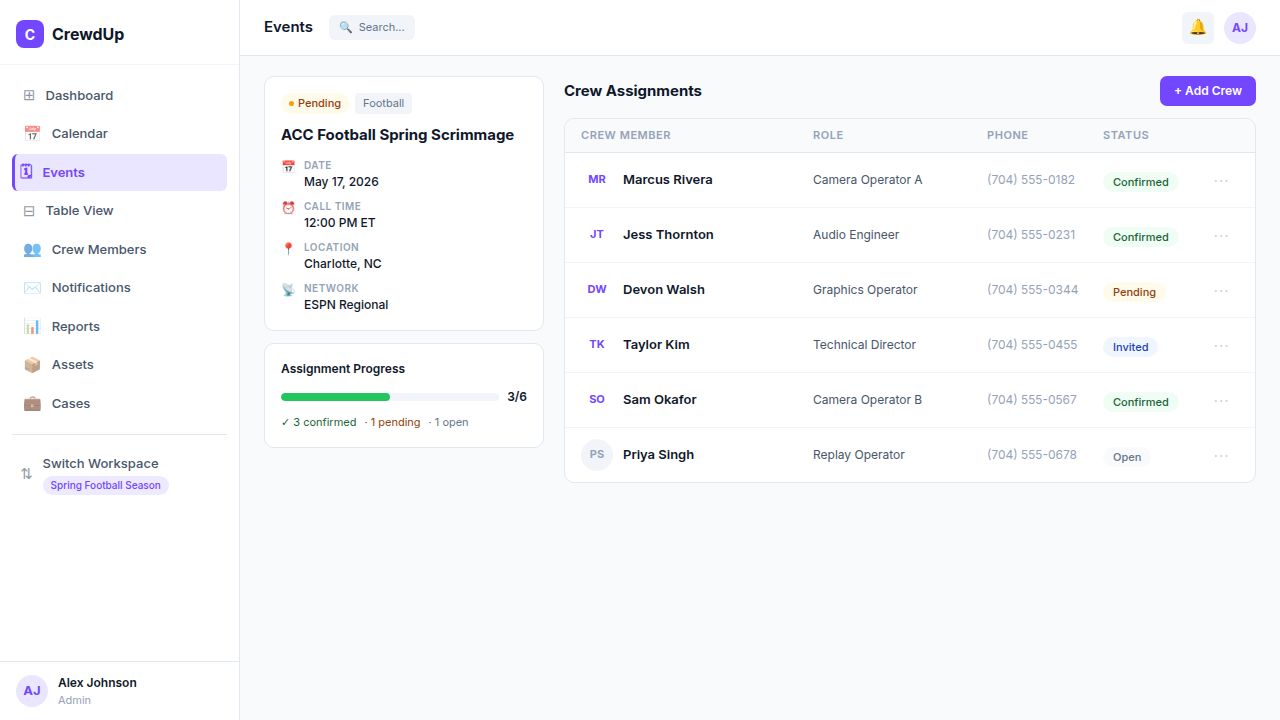
    One-click crew invitationsConfirmation tracking dashboardAuto-fill from saved roster
    02Gear disappears between events›
    03Communication falls through the cracks›
    04No visibility into production history›
    🔒app.crewdup.com
    Crew scheduling chaos
    ✅
    3 of 6 confirmed
    ACC Football · May 17
    📧
    4 invites sent
    Awaiting responses
    No crew account required
    Crew confirms via a one-click email link — nothing to download or sign up for.
    Calendar invites sent automatically
    A .ics file is attached the moment someone confirms — works with Google, Apple & Outlook.
    Asset tracking built in
    Every piece of gear has a home. Track cases, shipments, and field locations from day one.
    Multi-workspace ready
    Run separate workspaces per client, sport, or season — all under one account.
    What's included

    Everything your production
    team needs, built in

    No bolt-ons, no integrations to maintain. Every feature below is included from day one.

    Event Management
    Full production detail per event
    Calendar, list & table views
    Multi-sport, multi-network support
    Timezone-aware call time scheduling
    Event status & progress tracking
    Workspace-scoped event isolation
    Crew Scheduling
    Saved crew roster with skill tags
    Position-based role assignments
    One-click invite links — no account needed
    Confirm / decline tracking per person
    Crew availability management
    Bulk invite from filtered roster
    Asset Tracking
    Full gear inventory per team
    Custom fields per asset category
    Case-based packing organization
    Status: active / in-field / maintenance
    Carrier-aware shipment logging
    Event assignment history per asset
    Notifications
    Branded invitation emails
    Confirmation & decline alerts
    Scheduled pre-event reminders
    Tech book email distribution
    .ics calendar invite on confirmation
    Full notification history & analytics
    Reports
    19-field custom report builder
    Filter, sort & group by any field
    Crosstab & pivot table views
    Calculated formula columns
    CSV export in one click
    Saved report configurations
    Teams & Workspaces
    Multi-workspace per team
    Role-based access: Admin, Manager, Crew
    Team invite codes with role targeting
    Workspace duplication for new seasons
    Team admin panel for members
    Active workspace context switching
    Getting started

    Up and running in minutes

    No lengthy onboarding. No training required. Four steps and your first event is ready to go.

    1
    Create your account
    Sign up and set up your team in seconds. No credit card needed to get started.
    2
    Build your roster
    Import or add crew members, assign skill tags, and organize by role.
    3
    Create an event
    Add all production details — date, location, positions, call times, and contacts.
    4
    Invite your crew
    Send one-click invites. Crew confirm from their inbox — no account required.
    Start your free trial →

    Up to 31 days free · No credit card required

    Ready to run a tighter operation?

    Join hundreds of production teams that schedule faster, communicate cleaner, and never lose track of gear.

    No credit card required · Up to 31 days free